Table of contents
- The one rule most form builder roundups miss
- How to choose an online form builder: by use case
- Online form builders at a glance
- Best online form builder for high-conversion lead & marketing forms
- Best online form builder for payments, orders & registrations
- Best online form builder for regulated data & approval workflows
- Best free online form builder for quick internal forms
- Best online form builder for feedback & research forms
- Online form builders: a quick decision matrix
- Best practices for designing online forms
- Why Responsly is the most flexible choice
- Conclusion: which online form builder should you choose?

Online form builders are no-code tools that let you create, publish, and collect responses from web forms—contact forms, lead-gen forms, order forms, applications, and feedback forms—without writing any code. This guide is for marketers, operations teams, and founders who are tired of generic “top 10” lists that rank tools by feature count. Instead, we rank the best online form builders by the job you actually need done. You’ll get a use-case decision matrix, honest trade-offs (including who each tool is not for), and concrete picks for conversion, payments, compliance, free internal use, and feedback. If you build on WordPress or Webflow, pair this with our WordPress surveys integration or Webflow surveys integration.
The one rule most form builder roundups miss
After building hundreds of forms across lead generation, onboarding, and customer feedback, we keep coming back to a single principle: every form builder optimizes for one of three things—conversion, control, or cost—and rarely all three at once.
- Conversion-first tools prioritize design, speed, and completion rate (great for marketing and lead-gen).
- Control-first tools prioritize data integrity, compliance, and approval workflows (great for healthcare, finance, and operations).
- Cost-first tools prioritize being free and frictionless (great for quick internal forms).
Form-usability research from the Baymard Institute repeatedly shows that unnecessary fields and clumsy layouts are a leading cause of abandonment—so “the best builder” is the one that fits your priority without forcing the other two trade-offs. Pick your priority first, then pick the tool.
How to choose an online form builder: by use case
Here is the quick map. Each row is a job-to-be-done, with our pick and the strongest runner-up.
| Job to be done | Best pick | Other strong option |
|---|---|---|
| High-conversion lead & marketing forms | Responsly | Typeform |
| Online payments, orders & registrations | JotForm | Cognito Forms |
| Regulated data & approval workflows (HIPAA/PCI) | Formstack | Formsite |
| Free, quick internal forms | Google Forms | Microsoft Forms |
| Unlimited free public-facing forms | Tally | Responsly (free plan) |
| Feedback & research forms (CSAT/NPS in a form) | Responsly | — |
Online form builders at a glance
A snapshot of the nine tools below before the detailed, use-case breakdown.
| Tool | Best for | Key features | Pricing |
|---|---|---|---|
| Responsly | Conversion + feedback in one | AI form generator, conversational & standard layouts, logic, omnichannel | Free plan; affordable paid |
| Typeform | Conversational marketing forms | One-question-at-a-time, media, logic jumps | Free basic; paid |
| JotForm | Variety + payments | 10,000+ templates, widgets, payment gateways | Free basic; paid |
| Cognito Forms | Simple paid order forms | Built-in payments, calculations, generous free tier | Free basic; paid |
| Formstack | Workflows & compliance | HIPAA/PCI, approval routing, document automation | Paid |
| Formsite | Secure, long forms | Field-level encryption, save & return | Trial; paid |
| Tally | Unlimited free public forms | Notion-style editor, unlimited forms & responses | Free; low-cost paid |
| Google Forms | 100% free internal use | Sheets sync, real-time collaboration | Free |
| Microsoft Forms | Free for Microsoft 365 teams | Native Excel/Teams integration, quizzes | Included with M365 |
Best online form builder for high-conversion lead & marketing forms
When the form is your funnel, design and completion rate matter more than anything else. A branded, single-question flow consistently outperforms a long, intimidating field grid—this is where Responsly and Typeform lead.
| Tool | Best for | Key strengths | Pricing |
|---|---|---|---|
| Responsly | Branded, high-converting forms | AI generator, dual layouts, logic, analytics | Free plan; affordable paid |
| Typeform | Visual, conversational forms | One-question-at-a-time, media-rich design | Free basic; paid |
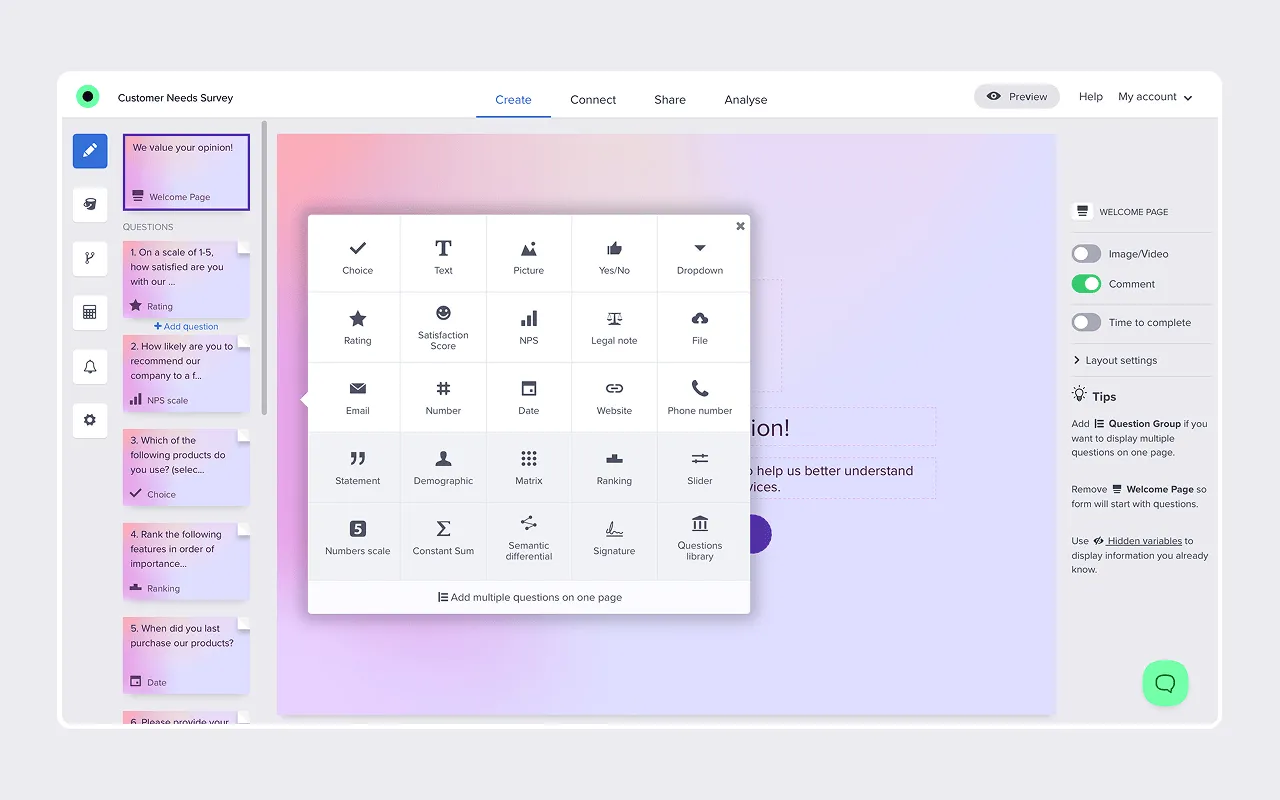
Responsly isn’t just a form builder—it’s an experience builder. While most tools produce static, forgettable forms, Responsly lets you ship forms that feel like modern landing pages: branded, interactive, and either classic or conversational. Type a prompt like “job application for a barista” into the AI form generator and you get a complete, logic-ready form in seconds. Add smart logic to hide irrelevant questions, then distribute by link, embed, or QR code—the same form runs everywhere.
What makes Responsly different for this use case is that conversion and analysis live in the same tool. You can A/B the layout, watch drop-off, and—because Responsly is an AI-powered feedback platform—read open-text answers automatically with Athena, its AI agent. It’s also an all-in-one workspace that handles surveys, quizzes, and NPS, so you don’t outgrow it. Captured leads can flow straight to your CRM and marketing stack through lead generation integrations, and the lead generation form template gives you a proven starting point.
- Best for: marketing, lead gen, applications, and any form where completion rate is the KPI.
- Not for: teams that need deep HIPAA/PCI workflow routing (see Formstack below).
- Pros: stunning design out of the box, AI generation, logic, omnichannel distribution, free plan.
- Cons: fewer native payment gateways than JotForm (Stripe is supported).
Start with the forms template library or create a free Responsly account.
Typeform popularized the conversational, one-question-at-a-time interface and remains excellent for brand-heavy, visual forms. The trade-off: reporting is lighter than a dedicated analytics platform, and costs climb quickly with response volume. If that’s your concern, Responsly offers the same conversational feel with built-in analysis—see why teams treat it as a leading Typeform alternative.
Best online form builder for payments, orders & registrations
If your form needs to take money—orders, event tickets, donations, or paid bookings—you want native payment gateways, calculation fields, and order logic. JotForm and Cognito Forms are the most flexible here.
| Tool | Best for | Key strengths | Pricing |
|---|---|---|---|
| JotForm | Any payment use case | 10,000+ templates, 30+ gateways, widgets | Free basic; paid |
| Cognito Forms | Simple paid forms on a budget | Built-in payments, calculations, large free tier | Free basic; paid |
JotForm is a heavyweight known for sheer breadth: thousands of templates, hundreds of widgets (signatures, calendars, calculators), and integrations with most major payment processors including PayPal, Stripe, and Square. It’s the safest pick when “form” means something different every week.
- Best for: order forms, registrations, e-signatures, and offline/mobile data collection.
- Not for: teams that want a clean, modern design system—the builder can feel cluttered.
Cognito Forms is the value pick: a genuinely generous free tier, strong calculation fields, and built-in payments make it ideal for small businesses that need a paid order form without a per-seat enterprise plan. Reporting and design polish are more basic than the leaders, but for straightforward checkout-style forms it’s hard to beat on price.
For payment-style flows inside Responsly (a paid registration that also captures feedback), Stripe is supported—and you can connect the rest of your stack through integrations and automation. For B2B procurement and internal requisitions (PO references, line items, ship-to data, and approvals), start from the order form template instead of a consumer checkout.
Best online form builder for regulated data & approval workflows
In healthcare, finance, government, and HR, the form is only the first step—the data then has to move securely and get approved. This is control-first territory, and Formstack is purpose-built for it, with Formsite as a strong secure runner-up.
| Tool | Best for | Key strengths | Pricing |
|---|---|---|---|
| Formstack | Compliance + workflow | HIPAA/PCI, approval routing, document generation | Paid |
| Formsite | Secure, long multi-page forms | Field-level encryption, save & return | Trial; paid |
Formstack focuses on data management rather than just collection. It routes submissions to the right people for approval, generates documents, and supports HIPAA and PCI compliance—often replacing brittle PDF and email workflows. Its deep Salesforce integration makes it a favorite for CRM-heavy operations.
- Best for: regulated industries and multi-step approval processes.
- Not for: simple forms or tight budgets—there’s no free-forever plan and pricing runs high.
Formsite is a veteran tool that prioritizes security. It can encrypt specific fields so sensitive inputs (ID numbers, financials) stay unreadable in the database without a key, and its “save & return” feature suits long, multi-page forms. The interface feels dated next to modern tools, but it’s reliable for security-conscious teams.
If you need Responsly’s own compliance posture before collecting sensitive data, review security and compliance.
Best free online form builder for quick internal forms
When you just need a fast poll, a sign-up sheet, or an internal request form, free and frictionless wins. Google Forms and Microsoft Forms are the two defaults for internal use, while Tally is the standout when you want a genuinely free form that still looks good in front of customers.
| Tool | Best for | Key strengths | Pricing |
|---|---|---|---|
| Google Forms | Google Workspace teams | Sheets sync, real-time collaboration | Free |
| Microsoft Forms | Microsoft 365 teams | Excel/Teams integration, built-in quizzes | Included with M365 |
| Tally | Unlimited free public forms | Notion-style editor, unlimited forms & responses | Free; low-cost paid |
Google Forms is the default for millions because it’s free, familiar, and syncs responses straight into Google Sheets. It’s perfect for a potluck sign-up or a quick internal survey—but it looks unprofessional for customer-facing use, offers limited logic, and has minimal branding. If you mainly live in Google but want a branded external form, generate a QR code for your form or upgrade to a dedicated builder.
Microsoft Forms is the equivalent for Microsoft 365 organizations: included in your subscription, with native Excel and Teams integration and a handy quiz mode for training. Like Google Forms, it’s great internally and limited for polished, branded data collection.
Tally is the most generous free option for public-facing forms. Its Notion-style editor makes building feel like writing a document, and the free plan includes unlimited forms, questions, and responses—rare among modern builders. That makes it a popular free Typeform alternative for indie makers and small teams. The trade-offs: analytics and team features are limited, advanced logic and integrations sit behind the paid tier, and there’s no built-in feedback analysis, so you’ll still export data elsewhere to understand open-text answers.
When a free tool stops being enough—because you need stronger logic, omnichannel distribution, or AI feedback analysis—that’s the natural moment to move up to Responsly’s free plan.
Best online form builder for feedback & research forms
Many “forms” are really feedback in disguise: a CSAT rating after checkout, an NPS question in an email, a post-event survey. Standard form builders capture the data; they don’t help you understand it. This is where treating the form as part of a feedback platform pays off.
Responsly blurs the line between forms and surveys on purpose. The same builder produces a lead-gen form and a NPS or CSAT survey, then Athena reads the open-text responses, clusters themes, measures sentiment, and flags churn risk. You can distribute feedback forms by email, SMS, web widget, or QR code, and start from ready-made customer feedback templates. Teams like DB Schenker lowered their survey drop rate by 40% after switching—largely by replacing rigid forms with shorter, better-designed ones.
If feedback is even part of your form strategy, a feedback-native tool removes the second step of exporting data into another system just to analyze it. Explore the feedback collection hub to see how it fits together.
Online form builders: a quick decision matrix
Don’t pick by feature count—match the tool to your priority.
| Your priority | Best pick | Why |
|---|---|---|
| Highest completion rate on branded forms | Responsly | AI generation, conversational layout, and built-in analytics |
| Conversational, media-rich marketing forms | Typeform | One-question-at-a-time design that lifts completion |
| Taking payments and complex orders | JotForm | 10,000+ templates and 30+ payment gateways |
| A cheap, simple paid order form | Cognito Forms | Built-in payments on a generous free tier |
| HIPAA/PCI data and approval workflows | Formstack | Compliance plus routing and document automation |
| Encrypted fields on long, secure forms | Formsite | Field-level encryption and save & return |
| A free internal form, zero budget | Google Forms / Microsoft Forms | Free and tied into your existing workspace |
| Unlimited free public forms with a clean editor | Tally | Notion-style builder with unlimited forms and responses |
| Forms that double as customer feedback | Responsly | Forms, surveys, and AI analysis in one platform |
Best practices for designing online forms
Choosing the tool is step one; building a form people finish is step two.
- Cut every non-essential field. Each extra field lowers conversion—ask only what you’ll actually use.
- Use conditional logic. Don’t show a “spouse name” field to someone who selected “single.” Responsly’s jump logic makes this trivial.
- Design for mobile. Most forms are opened on phones; test on a small screen before publishing.
- Make it accessible. Proper labels, contrast, and keyboard navigation widen your audience—see our guide to accessible forms.
- Add input masks. Auto-format phone numbers and dates to prevent dirty data.
- Redirect to a real success page. Send users to a “thank you” page with a next step instead of a plain confirmation message.
For deeper question design, our survey design guide applies directly to forms too.
Why Responsly is the most flexible choice
If your needs span more than one row in the tables above—say, lead-gen and feedback, or branded forms and NPS tracking—Responsly is the tool least likely to box you in. You get:
- AI form and survey generation to launch in minutes.
- Conversational or classic layouts to maximize completion.
- Omnichannel distribution—link, embed, email, SMS, WhatsApp, and QR codes.
- Built-in analysis with Athena, so insight doesn’t require a second tool.
- Forms, surveys, quizzes, and NPS/CSAT/CES in one workspace, with a forms template library to start fast.
It scales from a free plan to business needs, which is why it fits both the conversion-first and feedback-first jobs without forcing you onto an enterprise contract.
Conclusion: which online form builder should you choose?
There’s no universal winner—only the right fit for your priority. Choose Google Forms or Microsoft Forms for free internal forms, Tally for unlimited free public-facing forms, JotForm or Cognito Forms for payments, Formstack or Formsite for regulated data and workflows, and Typeform for purely conversational marketing forms. Choose Responsly when you want modern, high-converting design, AI features, and the ability to turn any form into measurable customer feedback—all in one platform.
Ready to build a form people actually finish? Create a free Responsly account and ship your first form today, or browse the form templates to start from a proven layout.
FAQ
What is the best free online form builder?
Which online form builder has the highest conversion rate?
Which form builder is best for collecting payments?
Are online forms GDPR and HIPAA compliant?
Can I embed an online form on my website?
What is a good alternative to Typeform?
Tagged in
Last updated