Table of contents

A topic labels what customers talk about; a theme interprets why it matters—and the real payoff comes when you connect each theme to a number, quantifying exactly how much it moves your CSAT, NPS, or CES. This guide is for CX, product, and support teams who collect feedback across channels but stop at word clouds and quote decks. You’ll learn the difference between themes and topics, how to build the structure that captures them, how to measure each theme’s numeric impact on your metrics, and which tools do it at scale—with honest trade-offs.
Themes vs. topics: the distinction that changes everything
People use “themes” and “topics” interchangeably, but treating them as the same thing is why so much feedback analysis stalls at “customers seem unhappy.”
- A topic is an organizational label. It tells you what customers are talking about—“shipping,” “pricing,” “onboarding,” “mobile app.” Topics bring structure to unstructured text.
- A theme is an interpretation. It’s a recurring pattern of shared meaning that tells you what is going on in relation to a topic—“setup takes too long for non-technical users,” “price increases feel unjustified without new value.”
Put simply: topics organize your data; themes explain it. A report that only lists topics tells the reader how you grouped comments. A report built on themes tells the reader what you now understand—and what to fix. Staying at the topic level is the difference between reporting and understanding.
| Topic | Theme | |
|---|---|---|
| Answers | What is mentioned? | Why does it matter? |
| Example | ”Onboarding" | "Non-technical users get stuck on API setup” |
| Nature | A label / bucket | A pattern of meaning |
| Use | Structure & filtering | Prioritization & action |
Why themes beat scores on their own
Metrics like NPS, CSAT, and CES are summary signals: they tell you that something changed, not why. Two companies with an identical NPS of 30 can have completely different reasons behind it, and you can’t act on a number.
Themes are what turn those numbers into decisions. They decode the tone, nuance, and intent hiding in free text—and they often surface an emerging problem before it shows up in the score. That early-warning quality is why theme analysis is worth building into your program instead of skimming a handful of verbatims each quarter.
But themes without a metric attached have the opposite failure mode: every theme looks equally important. A theme mentioned 500 times looks urgent whether those mentions are praise or complaints. So the goal isn’t just to find themes—it’s to weigh them.
From topics to themes to impact: a workflow
Here’s a repeatable loop you can run every feedback cycle.
Step 1: Centralize feedback across channels
Themes are only trustworthy when they’re built from everything customers say, not one loud channel. Pull survey verbatims, support tickets, reviews, and chat logs into one place so a customer who mentions “slow support” in a survey and again in a ticket gets counted consistently. Collecting across email, SMS, website, and in-app in one platform removes the stitching work.
Step 2: Discover topics, then interpret themes
Start bottom-up: let the data cluster into topics (“checkout,” “delivery ETA,” “agent empathy”), then interpret the recurring patterns of meaning inside each topic into themes. Aim for specific, multi-word themes anyone in the company understands—“difficulty registering via SSO,” not just “registration.” A practical benchmark: at least ~80% of feedback should fall into repeating themes, or your structure has gaps.
Step 3: Add sentiment to every theme
Themes tell you what; sentiment tells you how customers feel. Layer them together so “onboarding” becomes “onboarding + frustration.” Modern LLM-based analysis reads context (“not bad” is mildly positive), catches sarcasm, and detects mixed sentiment in one comment (“love the product, but setup was painful”). See sentiment score and net sentiment score for the metrics this produces. Themes without sentiment lack urgency; sentiment without themes lacks the operational detail to fix anything.
Step 4: Quantify each theme’s impact on the metric
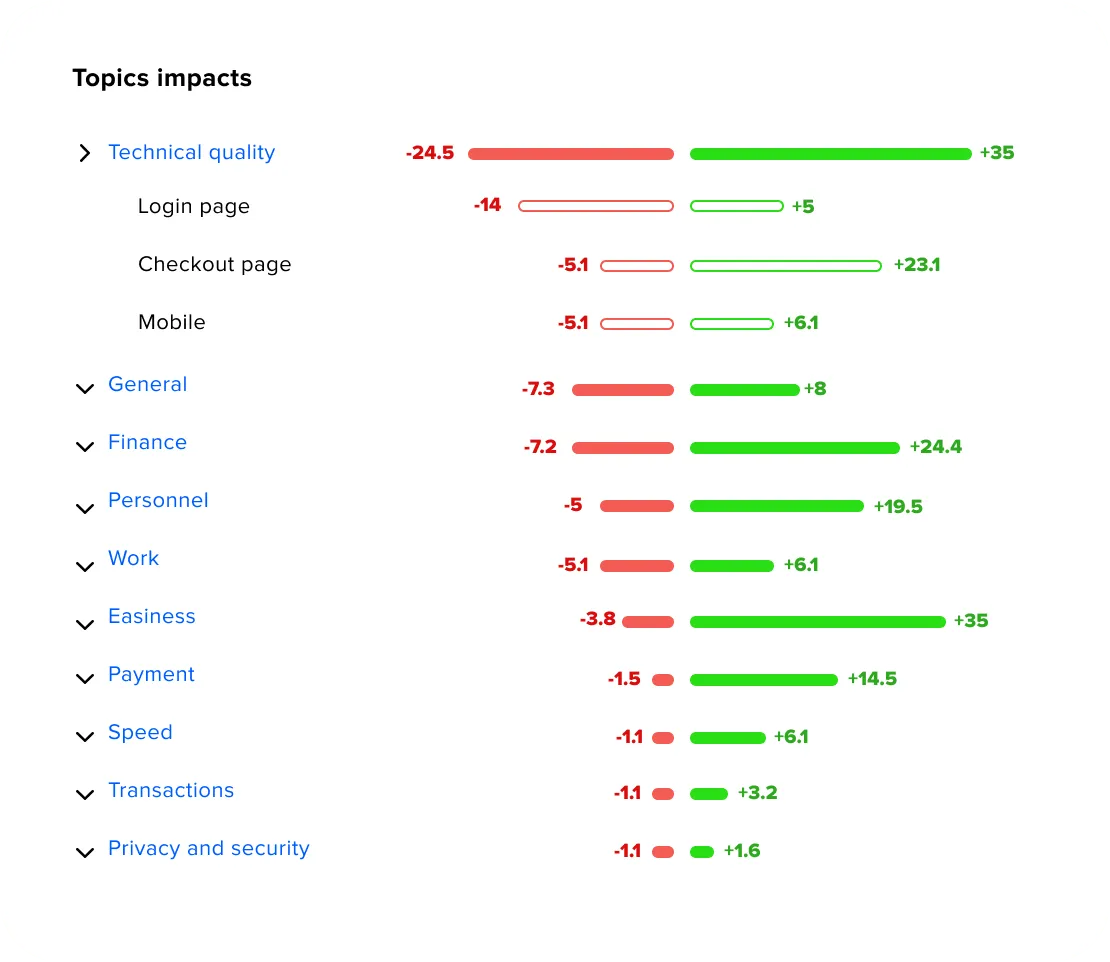
This is the step most teams skip—and the one the user actually asked for. Basic analysis tracks theme volume. Impact analysis measures how much a theme moves a quantitative indicator: compare the CSAT/NPS/CES of responses that mention a theme against those that don’t, and express the gap in score points.
That reframes prioritization completely:
“Checkout was mentioned 400 times” → volume. “Late delivery between days 5–7 drives 23% of NPS detractors” → impact.
| Theme | Volume (mentions) | Sentiment | Impact on NPS |
|---|---|---|---|
| Late delivery (days 5–7) | 210 | Negative | −6.1 pts |
| Confusing pricing tiers | 340 | Mixed | −2.3 pts |
| Responsive support | 180 | Positive | +4.4 pts |
| Mobile app crashes | 95 | Negative | −5.8 pts |
Notice how “confusing pricing” has the highest volume but a smaller score impact than lower-volume themes like delivery and app crashes. Ranking by impact—not word count—sends the highest-leverage fixes to the top of the roadmap.
Step 5: Watch theme velocity for early warnings
Impact tells you what’s costing you now; velocity tells you what’s about to. Theme velocity measures how fast a theme is growing in volume and intensity over time. A theme accelerating this week is a friction point your NPS hasn’t caught yet—track it so you can act before the score drops, not after.
Step 6: Prioritize, route, and close the loop
Weight each theme by three signals—volume, sentiment/severity, and segment value (is it your highest-value or most at-risk accounts?)—and break ties with impact-on-score. Route flagged themes to the owning team, ship the fix, and confirm the metric recovers. For the follow-up playbook, see our closed feedback loop guide.
Common mistakes with themes and topics
- Stopping at topics. A list of buckets is reporting, not insight. Interpret the pattern of meaning inside each topic.
- Ranking by volume alone. The loudest theme isn’t always the costliest. Use impact-on-score to prioritize.
- Themes without sentiment. You can’t tell praise from a churn signal, so every theme looks equally urgent.
- Too many overlapping themes. When two people tag the same comment differently, your data fractures. Keep themes specific but consolidated, and review the taxonomy quarterly. (See customer feedback categorization for building the structure itself.)
- Ignoring velocity. Volume and impact are lagging; velocity is leading. Skipping it means you react to score drops instead of preventing them.
Best tools for theme, topic, and impact analysis in 2026
The market splits into two kinds of tools: ones that only analyze feedback you collected elsewhere, and ones that collect and analyze in a single loop. That difference decides how much stitching your team does.
| Tool | Best for | Collect + analyze? | Theme approach | Impact on metrics |
|---|---|---|---|---|
| Responsly | Collecting and analyzing themes in one place | Yes | Athena AI clusters open text, adds sentiment, flags churn; GDPR-first | Ties themes to CSAT/NPS/CES with numeric impact |
| Chattermill | Enterprise multi-channel CX intelligence | Analyze only | Lyra AI aspect-based sentiment + themes | Impact analysis linking themes to NPS/CSAT/CES |
| Enterpret | Product-led B2B feedback ops | Analyze only | Adaptive taxonomy + Customer Context Graph | Account-level impact, not just volume |
| Thematic | Research-grade, analyst-controlled | Analyze only | Bottom-up theme discovery, fully traceable | Statistical impact of themes on KPIs |
Analysis-only specialists
If you already collect feedback elsewhere and want a deep intelligence layer on top, three names come up repeatedly:
- Chattermill unifies feedback from surveys, tickets, reviews, social, and calls into one layer and uses aspect-based sentiment analysis to score sentiment at the topic level, then connects those themes to movements in NPS, CSAT, CES, and revenue.
- Enterpret is built for product-led B2B and SaaS teams. Its Customer Context Graph ties every comment to the specific customer who left it, so you analyze themes by segment and account value rather than aggregate volume.
- Thematic is the research-grade choice: a bottom-up, unsupervised approach where every theme traces back to the exact verbatims behind it, and analysts can merge or edit themes without vendor involvement. Its impact analysis quantifies how strongly each theme moves your KPIs.
The trade-off with all three: you’re adding a tool on top of your collection stack, not consolidating.
Responsly — collect feedback and quantify themes in one place
Most theme-analysis tools assume you already collected feedback somewhere else. Responsly closes that gap: you collect feedback across channels and analyze the themes in one platform. Its AI agent Athena reads every comment, clusters open-ended responses into themes, tags sentiment and emotion, and—critically—shows how each theme impacts your CSAT, NPS, and CES numerically, so you see which topics are actually moving the needle instead of guessing from volume.
Because Athena watches those KPIs continuously, it also runs root-cause analysis when a score moves (which segment, channel, or theme drove it) and surfaces a prioritized action list in feedback analytics dashboards where the score and its reasons sit side by side. It’s built in Europe, so it’s GDPR-first by default—important when feedback contains personal data. Teams at Red Bull, DB Schenker, and Schneider Electric use it.
Turn themes into a number you can act on
If your program measures satisfaction precisely but explains it anecdotally, the missing layer is theme analysis with impact attached. With Responsly you can:
- Collect feedback across email, SMS, web, and in-app, with open-ended follow-ups built in.
- Let Athena cluster open text into themes, add sentiment, and flag churn signals—no data-science team required.
- Rank themes by their numeric impact on CSAT, NPS, and CES, then track velocity in feedback analytics and route flagged themes to the right team.
- Keep everything GDPR-first, because feedback often contains personal data.
For the broader program, see our Voice of Customer guide, and to analyze the free text behind a single metric, read how to analyze open-ended NPS comments.
Conclusion
Topics tell you what customers mention; themes tell you why it matters; impact analysis tells you how much it’s worth in score points. Centralize feedback, discover topics and interpret them into specific themes, add sentiment, and—above all—quantify each theme’s impact on CSAT, NPS, and CES so you prioritize by leverage instead of loudness. Analysis-only tools like Chattermill, Enterpret, and Thematic are strong if you collect feedback elsewhere; if you want to collect and quantify themes in one GDPR-first platform, Responsly’s Athena is the most direct path.
Ready to see which themes are moving your score? Create a free Responsly account and let Athena turn your open-text feedback into ranked, quantified drivers.
FAQ
What is the difference between a theme and a topic in customer feedback?
How do you measure the impact of a theme on CSAT or NPS?
Should you prioritize themes by volume or by impact?
Can AI find themes in feedback automatically?
What are the best tools for theme and topic analysis?
Published