Table of contents
- How Google reviews work (and what you should avoid)
- Google reviews vs. Google rating: what actually moves the needle
- The “survey first” workflow (compliant way to increase Google reviews)
- How to ask for Google reviews (without sounding pushy)
- Review collection methods compared
- Detailed scripts per industry
- How to increase Google reviews: 8 proven strategies (+1 process upgrade)
- How to handle Google reviews (respond the right way)
- How businesses can increase Google reviews at scale
- Use Responsly to systemize your Google review process
Google reviews are public, star-rated comments customers leave on your Google Business Profile, and your Google rating is the running average of those stars shown in Google Search and Google Maps. If you want to increase Google reviews — and actually improve your Google rating — you need a process that is consistent, easy for customers, and aligned with Google’s policies. This guide is for local businesses, e-commerce brands, and B2B teams that want more reviews and a higher star average without spammy “hacks”. You’ll learn the difference between review volume and rating (with the simple math behind it), when and what to ask, how to use QR codes and automation, how to handle negative reviews, and how a short survey workflow lifts your experience before customers review you publicly.
Quick answer — how to increase Google reviews (and your rating):
- Deliver a great experience, then ask every satisfied customer at the right moment.
- Send a short satisfaction survey first to catch and fix issues before they become public reviews.
- Make reviewing one-click with review links in email, SMS, and a QR code.
- Reply to every review — this is how you improve your Google rating, not just your review count.
- Repeat consistently: a steady process beats one-time spikes and is the only reliable way to increase reviews on Google.
The sections below expand each step and include copy-paste templates.
How Google reviews work (and what you should avoid)
Google’s policies are clear: reviews should be honest and not manipulated. That means you should avoid tactics like buying reviews, posting reviews yourself, or selectively asking only certain customers to review (often called “review gating”). Instead, build a workflow that:
- makes it easy for all customers to leave an honest review,
- captures private feedback early (so you can fix issues fast),
- follows up professionally, without pressure.
For reference, see Google’s documentation on prohibited and restricted content and review best practices.
Google reviews vs. Google rating: what actually moves the needle
Your Google rating is the average of every star score you have received; your number of reviews is the count of those scores. To improve your Google rating you can either earn more high-star reviews or fix the issues causing low ones — in practice you need both. Volume and rating are linked but not identical, and the fastest gains come from raising the quality of the experience first, then asking more satisfied customers to review.
How to increase your Google rating (the math)
The formula is simple, and it explains why early reviews matter so much:
Your existing volume decides how hard it is to move the average. Suppose you have 20 reviews at a 4.0 average (80 stars total) and you want to reach 4.5. Solving for the number of new 5-star reviews (x) you need:
You would need about 20 new 5-star reviews to lift a 4.0 rating to 4.5. The lesson: the more reviews you already have, the more new positive ones it takes to shift your rating — so the goal is a steady, repeatable collection process and fixing recurring problems early, not chasing a one-time spike. The rest of this guide shows how to build that process.
The “survey first” workflow (compliant way to increase Google reviews)
The most reliable way to increase Google reviews is to add a short feedback step after a purchase, delivery, appointment, or support interaction. The goal is not to “filter out” unhappy customers from reviewing. The goal is to:
- detect issues early,
- recover unhappy customers faster,
- and make it easy for satisfied customers to leave a review while the experience is fresh.
You can run this workflow using a short Customer Satisfaction (CSAT) survey template and a follow-up message that links to your Google review page.
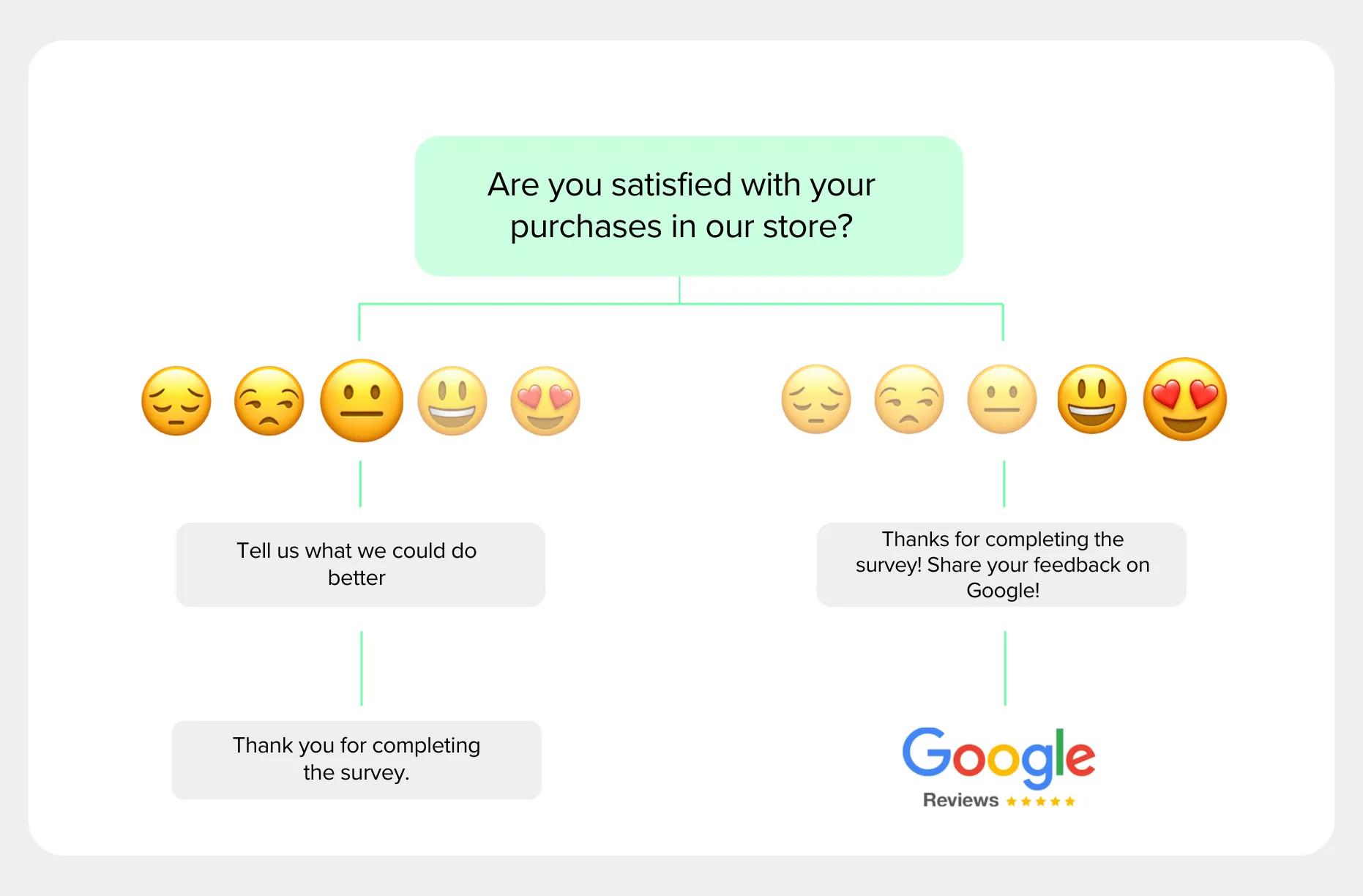
Encouraging customers to leave reviews after every purchase can backfire when the experience is not resolved yet (late delivery, product issue, unresolved ticket). The fix is simple: request feedback first, then follow up with the review request after the experience is confirmed or recovered.
The method: send a short satisfaction survey first, then follow up with a Google review request to the same audience once you’ve handled issues. This reduces surprises, improves the customer experience, and typically increases the share of customers willing to write a review.
Step 1: Send a short customer satisfaction survey
Send a short survey by email, SMS, WhatsApp, or a link after the interaction. If you need a starting point, use:
- customer satisfaction survey template
- survey maker (for web links and embeds)
- SMS surveys or email surveys (for distribution)
Keep it short. The key is speed and clarity. Recommended questions:
How do you rate the quality of our product/service?
How satisfied are you with your purchase or visit? (CSAT)
How likely are you to recommend our company to friends or family? (NPS)
Add one optional open-ended question:
- What is the main reason for your score?
This creates a clean loop: you get actionable feedback, and customers feel heard. If you collect a lot of open-ended answers, let Athena, our AI agent, read them at scale to surface recurring themes, sentiment, and at-risk customers — so you know what to fix before it shows up in public reviews.
Step 2: Fix issues fast (before you ask for reviews)
Negative feedback is a signal. Treat it like an operational input, not a reputation problem. After you identify unhappy customers, use a consistent recovery process:
- contact the customer quickly (same day if possible),
- acknowledge the issue and clarify what happened,
- offer a reasonable fix (replacement, refund, rework, escalation),
- confirm the resolution.
If you want to operationalize this across channels, use a CX workflow like CX teams and track results in one place (responses, sentiment, themes, and follow-ups). For a broader framework, see our guide to customer experience and a practical primer on improving customer service.
How to ask for Google reviews (without sounding pushy)
Most people do not leave reviews because they are busy, not because they are unhappy. Your job is to reduce friction and ask at the right moment.
Use a simple message template (copy/paste)
Here are safe, high-performing templates you can reuse.
Email template
Subject: Quick question about your experience
Hi {{first_name}},
Thanks for choosing {{business_name}}. If you have 30 seconds, could you leave an honest Google review? It helps other customers find us and helps our team improve.
Review link: {{google_review_link}}
Thank you, {{signature}}
SMS template
Hi {{first_name}} — thanks for visiting {{business_name}}. Would you leave an honest Google review? {{google_review_link}}In-store template (staff)
If you have a moment later today, we’d really appreciate an honest Google review. Here’s a QR code you can scan.
Make the review link one-click
Where to place your review link:
- post-purchase emails,
- delivery confirmation emails,
- invoices/receipts,
- order tracking page,
- support ticket “resolved” message,
- in-store QR code.
If you need a QR, use the free QR code generator and print it on a small card near the exit or include it in packaging.
Review collection methods compared
If you are wondering whether to ask directly or use a survey-first approach, here is how they compare in terms of risk, volume, and quality.
| Method | Best for | Pros | Cons | Responsly support |
|---|---|---|---|---|
| Direct Ask (Link only) | High-volume, low-risk transactions (e.g. coffee shop) | Fast, zero friction, highest volume of reviews. | High risk of negative reviews if something went wrong; no private feedback loop. | Yes (via QR codes or link distribution) |
| Survey-First (Feedback loop) | B2B, Service businesses, E-commerce, Healthcare | Catch unhappy customers privately; higher average rating; detailed feedback. | Slightly more friction (2 steps); lower total volume than direct link. | Yes (Recommended) – via Survey Maker & logic jumps. |
| Gating (Forbidden) | Not recommended | Filters out all negatives artificially. | Violates Google Policy; risks account suspension; unethical. | No (We support compliant logic only). |
| Automated Email/SMS Flow | Scaling businesses (50+ transactions/mo) | Consistent; no manual work; measurable results. | Requires setup; needs integration with CRM/POS. | Yes – via Email & SMS automation. |
Detailed scripts per industry
Since “asking at the right moment” is the most important factor, here are specific scripts tailored to different business models.
E-commerce & Retail script
Timing: 3-5 days after delivery (product received and opened). Subject: How is your new [Product Name]?
“Hi [Name], we hope you’re loving your new [Product].
We’re a small team, and every review helps us grow. If you’re happy with your purchase, could you share a quick photo or comment on Google?
[Link to Google Review]
If anything is wrong, just reply to this email and we’ll fix it instantly.”
B2B Service / SaaS script
Timing: After a specific milestone (e.g., project launch, successful implementation, or positive QBR). Subject: Quick question about our partnership
“Hi [Name], glad we hit the [Milestone] target this week.
My boss asked me to gather some feedback on our project handling. If you have 30 seconds, would you mind sharing your experience on our Google profile? It helps us build trust with other partners like you.
[Link to Google Review]
Thanks, [Account Manager]“
Local Service (Plumber, Dentist, Salon)
Timing: Immediately after service (in-person) or via SMS within 1 hour. Script (In-person):
“Thanks for coming in today, [Name]. If you’re happy with the service, scanning this QR code and leaving a 5-star review really helps me out personally. No pressure though!”
Script (SMS):
“Hi [Name], thanks for visiting [Business]. Quick favor: if you liked the service, could you tap 5 stars here? [Link] It helps more locals find us. Thanks!”
How to increase Google reviews: 8 proven strategies (+1 process upgrade)
Increasing the number of positive Google reviews is essential for building credibility and enhancing your brand’s visibility. Here are eight effective strategies that help you boost your Google review count in a professional and reliable way:
Ask at the right moment: ask right after a successful interaction, when the value is delivered (delivered package, completed appointment, solved ticket). Avoid asking when something is still “in progress”.
Simplify the review process: use a direct link to your review form. Avoid multi-step instructions and avoid sending people to your homepage.
Automate follow-ups: set one follow-up reminder (not a sequence of five). For scale, connect your workflows to survey analytics so you can see response rates and themes.
Use customer satisfaction surveys: a short survey helps you detect issues early and improves the experience before customers review. Start with the customer satisfaction survey template, then follow up with the review link after the interaction is complete.
Avoid incentives that violate policy: some incentives can be risky and may conflict with platform rules. A safer approach is to improve the experience and simply ask with a short, respectful message.
Use QR codes in-store and in packaging: a QR code removes friction. Pair it with a short script so it does not feel awkward for staff.
Respond to every review: respond to positive reviews to reinforce loyalty, and respond to negative reviews to show accountability. Keep replies short, calm, and specific.
Reuse social proof: add reviews to your website and sales collateral (with permission). Social proof increases trust and also reminds customers that reviews matter.
Bonus process upgrade: turn reviews into a measurable KPI
Treat review generation like a simple pipeline, not a random event:
| Step | What you track | Target outcome | Common mistake |
|---|---|---|---|
| 1. Ask for feedback | Survey response rate | Enough signal to learn | Survey is too long |
| 2. Fix issues | Resolution time | Faster recovery | No ownership |
| 3. Ask for a review | Review conversion rate | Steady new reviews | Asking at the wrong moment |
| 4. Respond publicly | Response rate/time | Trust + credibility | Copy/paste robotic replies |
How to handle Google reviews (respond the right way)
To handle Google reviews well, reply to every review — positive and negative — quickly, calmly, and specifically. Thank happy customers, and for negative reviews acknowledge the problem, take it offline to fix it, and address the root cause so it does not repeat. A thoughtful public reply reassures future customers far more than the original complaint hurts you.
Many businesses fear negative reviews, but they are an opportunity to show professionalism. A well-handled negative review can convert a detractor into a promoter — or at least show prospective customers that you care.
The H.E.A.R.D. framework for replies:
- Hear: acknowledge the complaint without being defensive.
- Empathize: validate their frustration (“I understand why that is disappointing”).
- Apologize: say sorry for the experience (even if it wasn’t fully your fault).
- Resolve: offer to take it offline to fix it (“Please email me directly at…”).
- Diagnose: internally fix the root cause so it doesn’t happen again.
Example reply:
“Hi [Name], I’m sorry to hear about your wait time. We aim for <10 minutes, and we clearly missed the mark today. I’d love to make it right — please email me at [email] so I can sort this out for you. Thanks for the honest feedback.”
For higher-stakes situations, our guide to customer service recovery walks through turning a bad experience into renewed loyalty.
How businesses can increase Google reviews at scale
Whether you run a local store, an online shop, or a SaaS company, the logic is similar – but the process can be more complex at scale. Here are a few tactics tailored to businesses that want to increase reviews on Google in a structured way.
Standardize requests across touchpoints
If you manage multiple locations or teams, define one clear, repeatable process:
When exactly do you ask for a review?
What message do you send?
Which link or QR code do you use?
This lets you increase Google reviews for business online in a consistent way instead of relying on individual employees to “remember to ask”.
Use automation instead of manual reminders
To increase Google reviews at scale, connect your CRM, e-commerce platform, or support system with a survey tool. After a purchase or ticket resolution, the system can:
send a short survey to measure satisfaction,
send a follow-up with your review link (with sensible frequency),
alert your team when someone is unhappy.
If you want a simple “link-based” workflow that works everywhere, use link surveys and route responses into your dashboard. To push the positive raters straight to your profile, the Google Reviews integration sends satisfied respondents to your Google review page automatically, and no-code tools like Make or n8n let you chain the survey, the review request, and the alert without writing code.
Track results and iterate
If you’re serious about how to increase Google reviews for business, treat it like a KPI:
- number of new reviews per week or month,
- average rating per location or product line,
- response time to negative reviews.
By continually optimizing these metrics, you can systematically improve your Google reputation and support long-term growth.
Use Responsly to systemize your Google review process
Google reviews are essential for any brand, and there’s never a wrong time to start working on increasing the number of reviews and ratings. But that’s not the end. You must consistently respond to reviews and take action where necessary, so customers are motivated to give your company another chance, even if they had a bad or unexpected experience.
With Responsly, you can:
- build a short post-purchase survey in minutes with online surveys,
- use survey templates to launch faster,
- distribute via SMS or email,
- monitor feedback and themes in survey results,
- automatically analyze open-ended feedback and spot themes, sentiment, and churn risk with Athena, our AI agent,
- and improve customer experience using CX teams.
If you want to set up this workflow now, create an account.
FAQ
Why “Google review hacks” don’t work (and what to do instead)?
How can a Google review survey help me get more reviews?
How to increase Google reviews for free?
How to improve your Google review rating if it’s already low?
How many Google reviews do I need to increase my rating?
How do I increase my Google rating, not just my review count?
How should I handle negative Google reviews?
Tagged in
Last updated