
When you run a survey, people often answer open-ended questions in different languages. Auto-translating survey responses helps you read multilingual feedback in one language for faster review, reporting, and sharing—without copying text into a separate translator.
In Responsly, this capability lives under Customer Heaven in your form Settings. This guide explains how to turn it on, what gets translated, where to read results, and how it differs from Translations (the language of the survey your respondents see).
Who can use this feature?
Customer Heaven appears in the Settings area while you edit a form. If you do not see it, your workspace may not include this option yet—contact Responsly support to check availability.
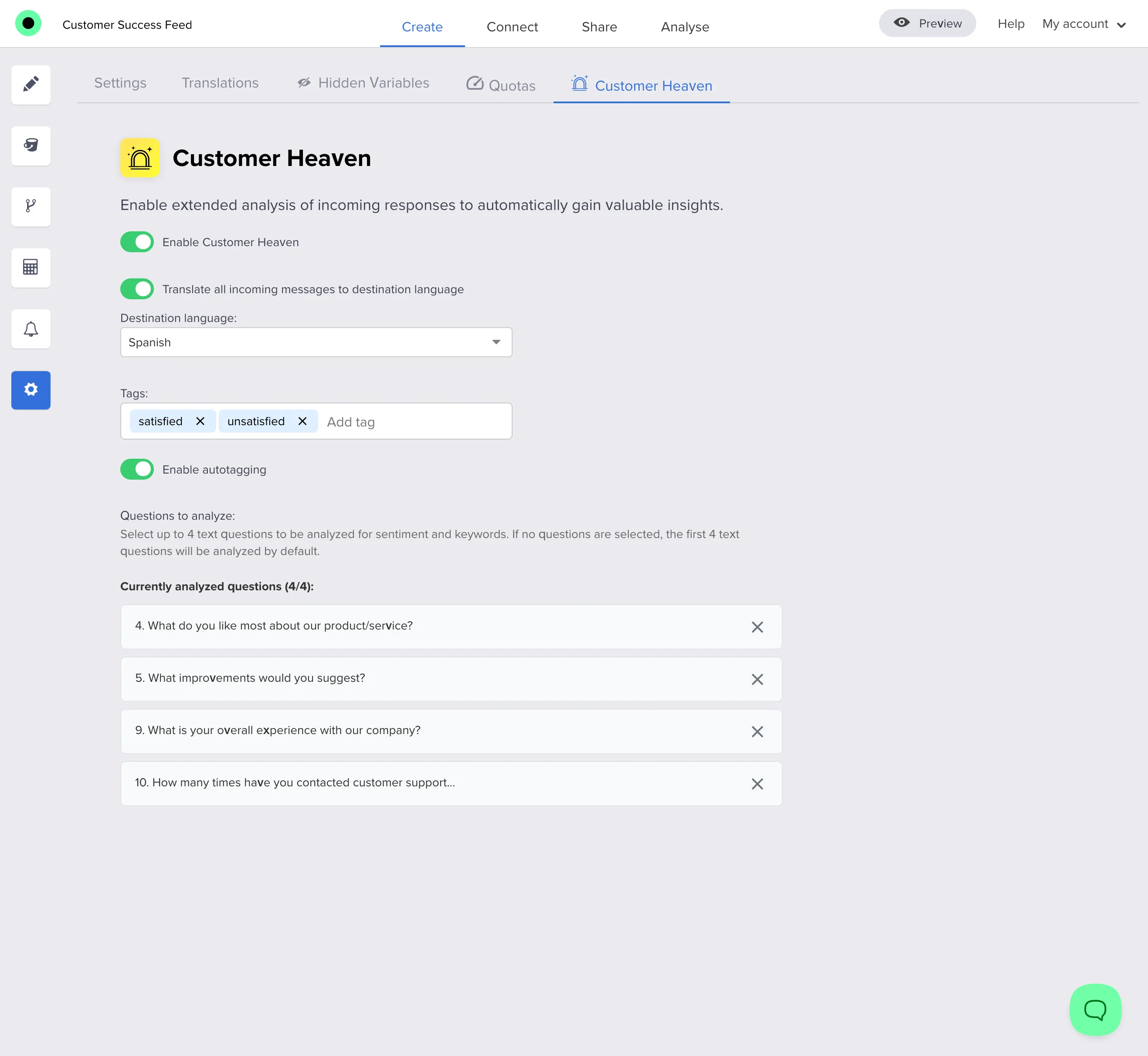
Turn on auto-translate for open text
Follow these steps in the form editor:
- Open the form you want to analyze.
- Go to Settings.
- Open Customer Heaven.
- Turn on Customer Heaven (the main switch).
- Enable Translate all incoming messages to destination language.
- Choose your Destination language—this is the language you want to read open-ended answers in.
After you save, new submissions will be processed using these rules.
What happens after someone submits?
The response is stored as soon as the respondent finishes. Open text answers you include in Customer Heaven are then processed automatically in the background (translation plus related insights—see below). That means you might not see the translated text the instant the submit button is pressed; refresh Analysis after a short time. If something still looks missing after a longer wait, refresh again or reach out to support.
What gets translated (and what does not)
- Translated: Open text questions that are part of Customer Heaven analysis—up to four text questions per form. You can adjust which text questions are analyzed in Customer Heaven; if you do not choose, the first eligible text questions are used by default. You can also exclude specific text questions from analysis if they should not be processed.
- Not translated this way: Closed question types (e.g. scales, choice lists) stay as submitted; focus here is on open-ended wording people type freely.
The same pass can also add helpful context for your team—such as sentiment, keywords, and optional autotagging when you configure tags—so you get translation together with lightweight analysis, without needing a separate tool.
Where to read translations in Analysis
In Analysis, open-ended blocks show the text your team needs. When a translation exists, you can switch between the translated version and the original so nothing is lost in review. You can also explore a word cloud view for text questions when that view is available—helpful for spotting themes across many answers.
Exporting original and translated text
When translation is enabled for responses, you can download results with extra columns for original open text alongside the translated text, which keeps spreadsheets audit-friendly. For step-by-step export options, see How do I export survey data?.
Notifications and shared views
Some email or integration summaries may show both the translated answer and the original wording when they differ, so recipients keep full context.
Customer Heaven vs survey Translations
| Translations (form languages) | Customer Heaven (response translation) | |
|---|---|---|
| Purpose | Show the survey UI and question text in a language respondents prefer | Read what people typed in open fields in your chosen language |
| You need | Add or edit languages under Translations | Enable Customer Heaven and translation settings |
You do not have to publish multiple survey languages to use response translation. They solve different problems: one is what respondents see, the other is how you read their free-text answers.
Build better multilingual surveys
Pair clear question types with a strong welcome page so respondents know how you will use their feedback. When you are ready to go live, use How to create a survey as your checklist, then keep Analysis open to watch multilingual open text roll in—translated for one-language review when Customer Heaven is enabled.
Collecting customer feedback in multiple languages does not have to slow your team down. With open text translation in Responsly, you keep originals for accuracy and still run survey analysis in one language everyone on the team can share.


