
Draw questions from pool turns your survey into a question bank. You add more questions than any one person should answer, set how many to draw, and Responsly picks a random subset for each respondent. Two people opening the same link normally get a different set.
This is different from random question order, which shuffles the sequence but still shows every question. Drawing from a pool changes which questions are asked at all.
Set up a question pool
- Add every question you want in the pool to your survey as usual.
- Click the cog icon in the left sidebar to open Settings.
- Turn on Draw questions from pool.
- Set how many questions to draw with the minus and plus buttons — the setting reads “Draw 3 from 5 questions”, where 5 is however many questions the survey currently has.
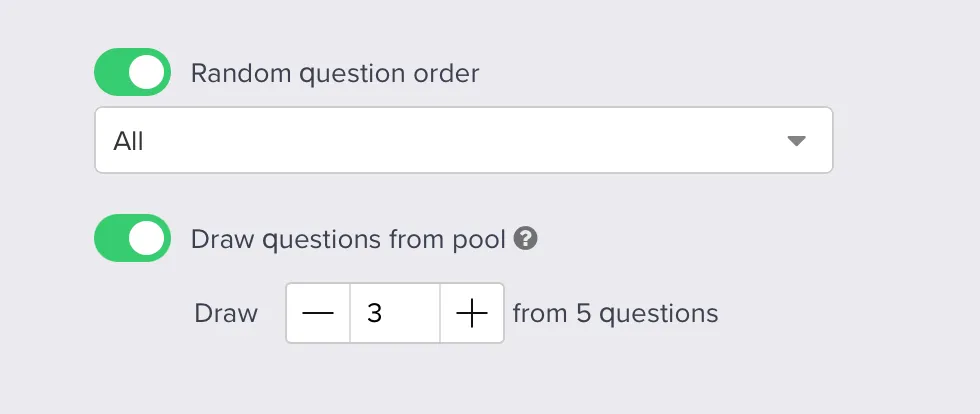
The number on the right updates as you add or remove questions, so check the setting again after editing the survey. If you add two more questions to a 5-question survey, the pool becomes 8 and your draw count stays where you left it.
When to use it
- Tests and exams. Every candidate gets a different set from the same bank, which makes answers much harder to pass around. Pair it with scoring to grade automatically.
- Long question banks. You have 30 questions worth asking and a 10-question attention span. Draw 10 and let the sample cover all 30 across respondents.
- Rotating creative or copy tests. Show each person a manageable slice of a large set of concepts instead of asking everyone to rate all of them.
What to watch out for
Each question collects fewer responses than your survey does. Drawing 3 from 5 means every question is seen by roughly 60% of respondents. With 200 responses that is about 120 answers per question, not 200. Work backwards from the base you need per question: responses needed per question ÷ (drawn ÷ pool size) is roughly the sample you have to collect.
Keep questions that other rules depend on outside the pool. If a question is not drawn, it is not answered, so nothing later can read from it. A scoring rule that must always fire, or a variable you pipe into a later question, belongs in the fixed part of your survey rather than in the pool.
Do not plan a pooled survey around branching. Randomization and skip logic do not work together — see random question order. Build pooled tests around scoring instead of branching paths.
Make pooled questions comparable. In a scored test, respondents only get the same maximum score if every drawn set is worth the same. Give pooled questions equal point values, or two candidates answering equally well can finish with different scores through no fault of their own.
Required questions still apply. Marking a pooled question as required affects the people who are shown it — it does not force it into the draw.
Combine with random order
The two settings stack. Draw questions from pool decides which questions a respondent sees, and random question order decides what order they see them in. Turning on both gives every respondent a different set in a different sequence — the usual setup for a test bank.


