Triggers and the audience decide whether a survey may appear. The How often card on the Share → Mobile app tab decides whether it may appear again, and during which dates.
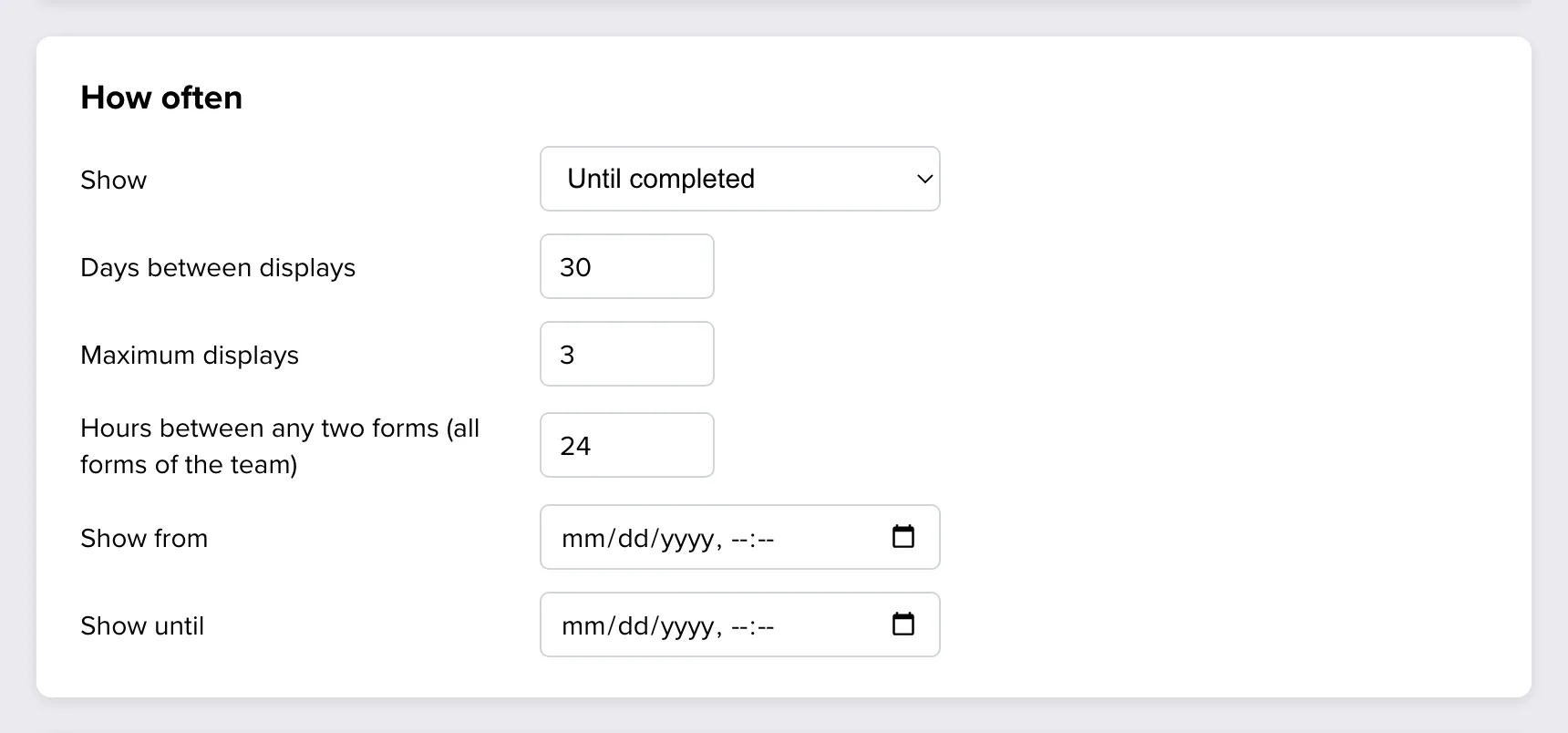
Frequency
Choose a mode in Show.
| Mode | The survey appears | Use it for |
|---|---|---|
| Once | One time on a device, whether the person answered or closed it. | A one-off question, such as feedback on a new feature. |
| Until completed | Again and again until the person finishes it. | A survey you want an answer to, without asking twice. |
| Repeatedly | Again after a number of days, also after a finished response. | Recurring measurements, such as NPS every quarter. |
| Every time | Each time the trigger matches. | A survey opened from a button, or after every support chat. |
Two settings limit the modes that repeat:
- Days between displays is the shortest time before the survey may come back on that device. It is used by Until completed and Repeatedly.
- Maximum displays is how many times one device may show the survey in total. Leave it empty for no limit.
A display is counted when the survey becomes visible, also when the person closes it without answering.
Tip: With Until completed, set both limits, for example 14 days between displays and at most 3 displays. People who close a survey three times are telling you something as well.
Counted on each device
The app remembers on the device which surveys it has shown. A person who uses your app on a phone and a tablet can see a survey set to Once on both. Reinstalling the app starts the count again, and so does logging out, if your app clears the user’s data in the SDK at that point.
Schedule
Show from and Show until limit the survey to a period, for example the two weeks after a release. Either field can stay empty. The time on the user’s device is used.
Outside the period the survey does not appear, and its channel can stay switched on.
Several surveys in one app
You can switch on the Mobile app channel for as many forms as you like. The SDK keeps them from getting in each other’s way:
- One at a time. Only one survey is on screen. A trigger that fires while another survey is visible is skipped, not queued.
- A pause between surveys. Hours between any two forms is one setting for all mobile surveys of your team. After a survey is shown by a trigger, no other survey is shown on that device until the hours have passed. With 24, a user sees at most one survey a day.
- One trigger, several surveys. When one event matches more than one survey for the same user, one of them is shown and the others are skipped. Do not rely on which one. Separate them with the audience or with different triggers.
Note: The pause applies to surveys that appear by a trigger. A survey the app opens from a button is shown regardless, and does not restart the pause.
Examples
| Goal | Settings |
|---|---|
| NPS every quarter | Repeatedly, 90 days between displays |
| Onboarding feedback, asked once | Once |
| Ask until answered, but do not nag | Until completed, 14 days between displays, maximum 3 displays |
| Feedback after every delivery | Every time, and 24 hours between any two forms |
| A campaign for two weeks | Once, with Show from and Show until |
The exact rules are in the developer documentation: Targeting → Frequency. If a survey comes back less often than you expect, go through Mobile app surveys: FAQ and troubleshooting.